

Exporting references from EBSCOhost to EndNote
This guide explains how to export references from the EBSCOhost interface as a RIS file and import them into EndNote Basic.
About EndNote Basic
EndNote Basic is a free online reference management tool, and the Library can offer support if you need help using it.
- You can create an account by signing up through Web of Science. This provides additional citation styles and attachment storage.
- We recommend registering with a personal email address so you can continue to access your account after graduation.
- The optional Cite While You Write plug-in for Microsoft Word on PC or Mac can insert citations and references into a document by linking directly to your online EndNote Basic account.
The procedure for adding references to EndNote varies depending on the database you are using. The steps below are for EBSCOhost.
Export references from EBSCOhost
Exporting from the EBSCOhost interface creates a RIS file which you will then import into EndNote.
- Select the resources you want to export.

Select the references you want to export. - Select Cite.

Choose Cite from the toolbar above the selected references. - Select Export citation, then choose Export in RIS format.

Export the selected references in RIS format. - Take note of the file name and where it is saved, for example your Downloads folder.
Import the references into EndNote
- In EndNote, go to Collect and then select Import References.
- Select Choose File and find the .ris file you created in EBSCOhost.
- Set Import Option to Citation.
- To keep references on the same topic together, select a group. You can also create a new group at this stage.
- Select Import.
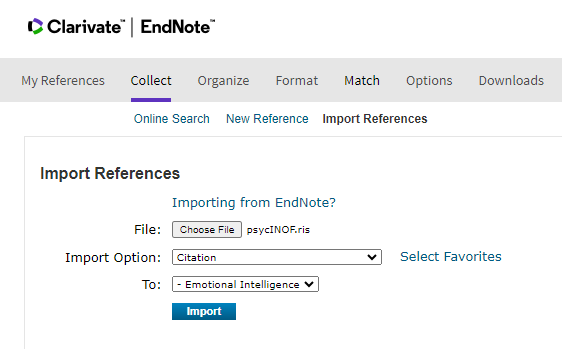
The Import References screen in EndNote Basic. - EndNote will display a message confirming that the import was successful.

A confirmation message is displayed after a successful import.